





Judy's TenKey
v4.5 Improvements
Judy's TenKey v4.5 provides the following improvements over v4.2, and the latest version can be ordered directly or as an upgrade:
Merchant Bar
A new optional row of calculation buttons including:
- Tax: Adds tax to the current entry.
- Discount: Subtracts a discount from the current entry.
- Markup: Adds to the current entry so that the total price reflects the current markup profit margin rate.
- Grand Total: Displays the sum of the main totals since last grand total.
Item Counter
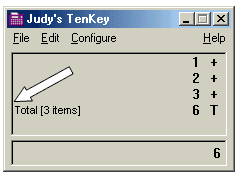
A very popular request, especially for accountants and other adding machine users, the item counter optionally keeps track of the number of items you included in your calculation, and shows it in a note on subtotal and total lines.
Tape Name
You can now name your tapes, such that the name will appear in the title bar of the window, at the top of any printouts, and as the file name (if you choose to save it).
Smart Tape Updates
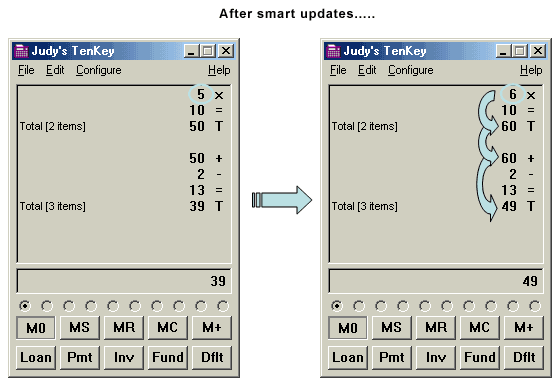
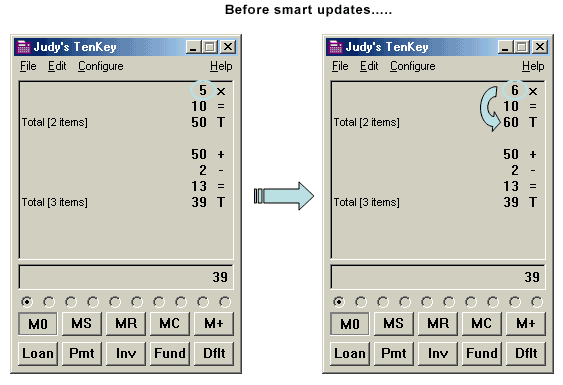
Judy's TenKey has always been able to automatically recalculate your tape whenever you made changes, but now it carries any changes forward to subsequent calculations, making updates a lot easier overall. In the example below, changing the top 5 to a 10 updates the first total, but now also updates the second total as well. Our user testing shows that "linked" calculations like this are very common, and that automatically updating each subsequent link significantly improves TenKey effectiveness.
Tooltips
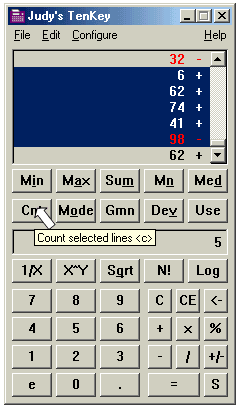
Resting your mouse pointer over any TenKey button now gives you information about the button (usually, its function and its keyboard equivalent).
Better Wheel Mouse Support
Now without clicking on the tape, you can scroll the tape up or down using the center wheel (if you have one) on your mouse. By clicking once on this wheel, you can also enter "scroll mode", in which the tape scrolls according to your mouse movements.
Improved Help
Help menu now activates the standard Windows "contents/index/find" dialog box, and a new help menu item brings up a list of all functions and their keyboard shortcuts. You can activate this feature any time using its own keyboard shortcut (Ctrl+K).
Function Keys
Selected functions now have Function Key shortcuts, to eliminate the need to hold down Shift or other somewhat awkward key combinations.
Automatic Saving
Although Judy's TenKey could previously be configured to automatically save its configuration and/or the current tape when you closed the application, these automatic saves were not triggered by a normal system shutdown. They are now!
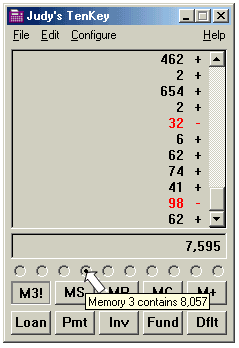
Memory Tooltips
Resting your mouse pointer over a memory radio button reveals the current contents of the memory.
Miscellaneous Improvements
Better auto-labeling when updating the tape, assorted bug fixes, better copy & paste support with other applications.
See also